USER BULLETIN · FSA-2026-002 · 27 August 2026
Change addresses beyond the recovery range
Frostsnap app · Read the technical report
Change could be placed beyond the range a wallet recovery scans. The coins stay in the wallet and none have been lost; most users are not affected. Update the Frostsnap app: it checks your wallet and tells you if you need to do anything.
What happened
A programming mistake in the Frostsnap app used up a fresh change address every time the send screen redrew. Every change of the fee rate, every device selected or deselected, and every reopening of the app redrew it. Each redraw pushed the payment’s change one address further along the wallet’s sequence. A standard wallet recovery scans a limited range of addresses, and change that lands past that range is not found.
The app itself remembers where it put the change, so for day-to-day use everything looks normal. The problem appears when the wallet is loaded without the app’s records: restored from its backup, reinstalled, or watched from its descriptor in other software such as Sparrow. In these cases, some coins can appear to be missing from the balance, or show in the balance but cannot be spent.
A user found and reported this problem.
Your bitcoin is safe
Every payment made from the app paid the intended recipient the intended amount, and the change came back to your own wallet, just further along the address sequence than it needed to be. Every affected coin can be found again by scanning further. The risk is to a user who does not know about this issue and restores with an old Frostsnap version, or judges their balance from other software at its default scan range.
Who is affected
Most users are not affected: the circumstances leading to an affected wallet are peculiar. You must have made a payment with change from the Frostsnap app before v0.4.0, after enough fee-rate changes, device selections or reopenings of the send screen to push the change past the scan range. One user is known to be affected: a watch-only view of their wallet in Sparrow showed less than the app did.
You are not affected if you have only ever received bitcoin, or if you built your transactions in other software and used Frostsnap only to sign them.
How to find out
Update the Frostsnap app. The new version checks for coins out of reach of a standard recovery. If it finds any, your wallet’s home page will prompt you to make one transaction, paying yourself, that brings them back within range.
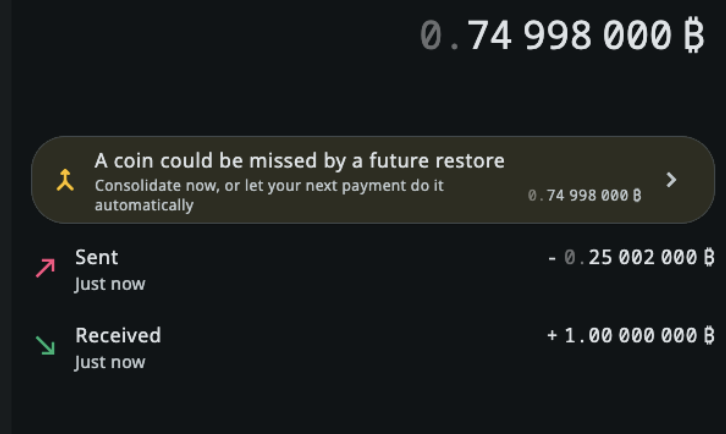
If you watch your wallet in Sparrow or similar software, raise its gap limit (Settings → Advanced in Sparrow, then Apply) so that it scans further. Your coins will appear.
What to do about it
- Update to v0.4.0 or later.
- Open your wallet and let it check.
- If the home screen says some coins are out of reach, tap the prompt. It prepares one transaction that pays those coins back to yourself at an address within reach, for you to review and sign. Or make an ordinary payment: the app includes those coins automatically.
- When that transaction confirms, you are done.
Until you update, each payment with change uses up more addresses. Update before you send again.
If you hold only a backup, restore it into Frostsnap v0.4.0 or later, which finds every coin. Other software given your descriptor and a wider gap limit will find them too.
If you are unsure, contact us
If a recovery has ever shown you less than you expected, or you would like us to check your wallet with you, email support@frostsnap.com. We would rather confirm everything is fine than leave you wondering.
The fixes are #542, #543, #545 and #550. The technical report has the detail.